
Azure (AKS)
Deploy vBuild runners onto an existing vCoCo cluster.
vBuild layers GitHub Actions Runner Controller (ARC) onto an existing vCoCo AKS cluster. Runners register with GitHub as a GitHub App that you own.
What gets deployed
Into the resource group holding the cluster:
- ARC controller (
gha-runner-scale-set-controller) in thearc-systemsnamespace. - A runner scale set (
gha-runner-scale-set) in thearc-runnersnamespace, wired to the GitHub config URL. - A Key Vault holding the GitHub App’s private key. The key is imported as non-exportable, so nothing can read it back out.
- A token refresher in the
vbuild-systemnamespace. Every 10 minutes it signs the App’s credentials through Key Vault and keeps short-lived GitHub tokens in the cluster for ARC and the link service. - The link service (optional, on by default) in the
vbuild-linknamespace, behind a static public IP. It lets job summaries post a short link to the run’s manifest instead of embedding the whole manifest in the URL. - User-assigned identities for the deployment script, the token refresher and the link service, each with only the roles it needs.
The same template handles initial deploys and in-place updates.
Prerequisites
- A vCoCo AKS cluster deployed via the Azure (AKS) guide. vBuild layers on top, so deploy that first.
- Permission to create and install GitHub Apps on your GitHub organization (an organization owner, or an App manager).
- A user with Owner on the resource group holding the cluster. The deployment assigns roles to its identities.
Deploy vBuild
-
Log in to the Azure Portal at https://portal.azure.com.
-
Visit the deploy UI at https://azure-vbuild.prod.eqtylab.io.
-
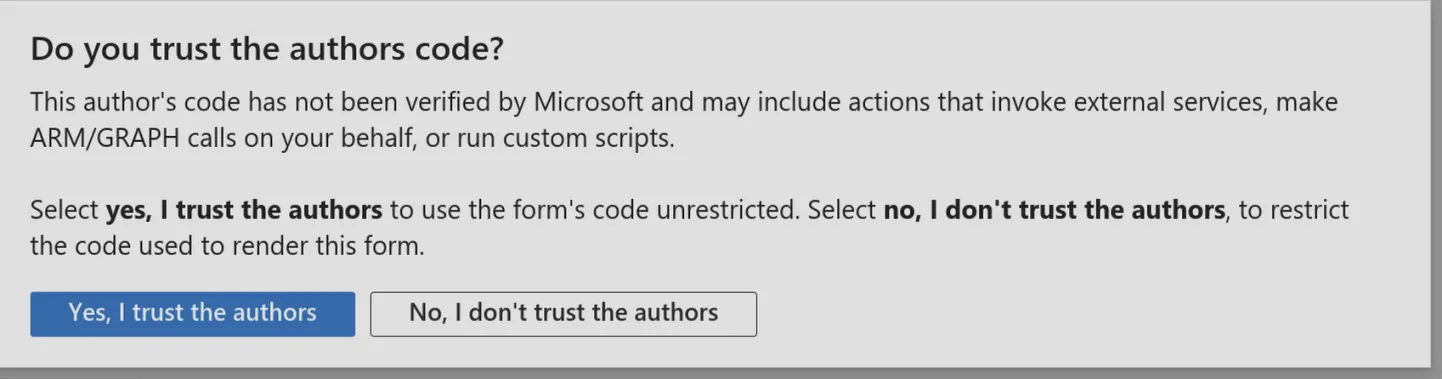
Trust the author’s code.
-
Select the
subscription,resource group, andregionholding the vCoCo cluster, then clickNext. -
Select the
AKS clusterproduced by the vCoCo deploy. -
On GitHub Actions, enter the
GitHub config URL(org-levelhttps://github.com/myorgor repo-levelhttps://github.com/myorg/myrepo). -
(Optional) Change the
Runner label. Defaults tovbuild. This is what workflows target withruns-on:. -
(Optional) Change the
Runner groupfromDefault. To round-robin one runner label across multiple clusters, use the same label on each cluster and give each a distinct runner group. -
On GitHub App, follow the steps on the page:
- Open the link to GitHub’s new App form, which has the name and permissions filled in, and click Create GitHub App. To use an App you already have, check it has the permissions listed on the page.
- Copy the App ID from the top of the App’s General page.
- Generate a private key, from the banner at the top of the General page or under Private keys at the bottom. This downloads a
.pemfile. - Click Install App in the left sidebar, click Install next to your organization, and choose All repositories or the repositories that run vBuild.
- Paste the App ID and upload the
.pemfile.
-
On Viewer links, leave the link service On unless you don’t want short links.
About viewer links
The link service lets job summaries link to the run’s manifest artifact instead of embedding the whole manifest in the URL. It runs in the cluster behind a static public IP with a Let’s Encrypt certificate. Workflows need
permissions: id-token: writeon the job that posts the link (the first vBuild job of a run), since it proves its run to the service with a GitHub OIDC token. When the service is off or unavailable, or a job lacks that permission, summaries embed the manifest as before. -
Deploy, and wait for the deployment to finish.
Several clusters can use the same GitHub App. Generate a separate private key for each, so one can be revoked without affecting the others.
Confirm the runners
Runners appear on GitHub under Settings → Actions → Runners at the org or repo level matching the config URL. Target them from a workflow with the runner label chosen at step 7:
runs-on: <runner-label>See the Quick Start for a full workflow example.
Verify runner pods are on the kata-remote-fuse runtime class:
az aks get-credentials -g <rg> -n <cluster>
kubectl -n arc-runners get pods -o jsonpath='{.items[*].spec.runtimeClassName}'
Updating
Redeploy from the same link with the same cluster. Leave the private key empty to keep the one already in Key Vault, or upload a new one to rotate it. The link service can be turned on or off on any redeploy. Turning it off removes it and releases its IP. Jobs then embed the manifest in their summary links again.
Next
- Quick Start — build and run your first vBuild workload.